Detailed breakdown
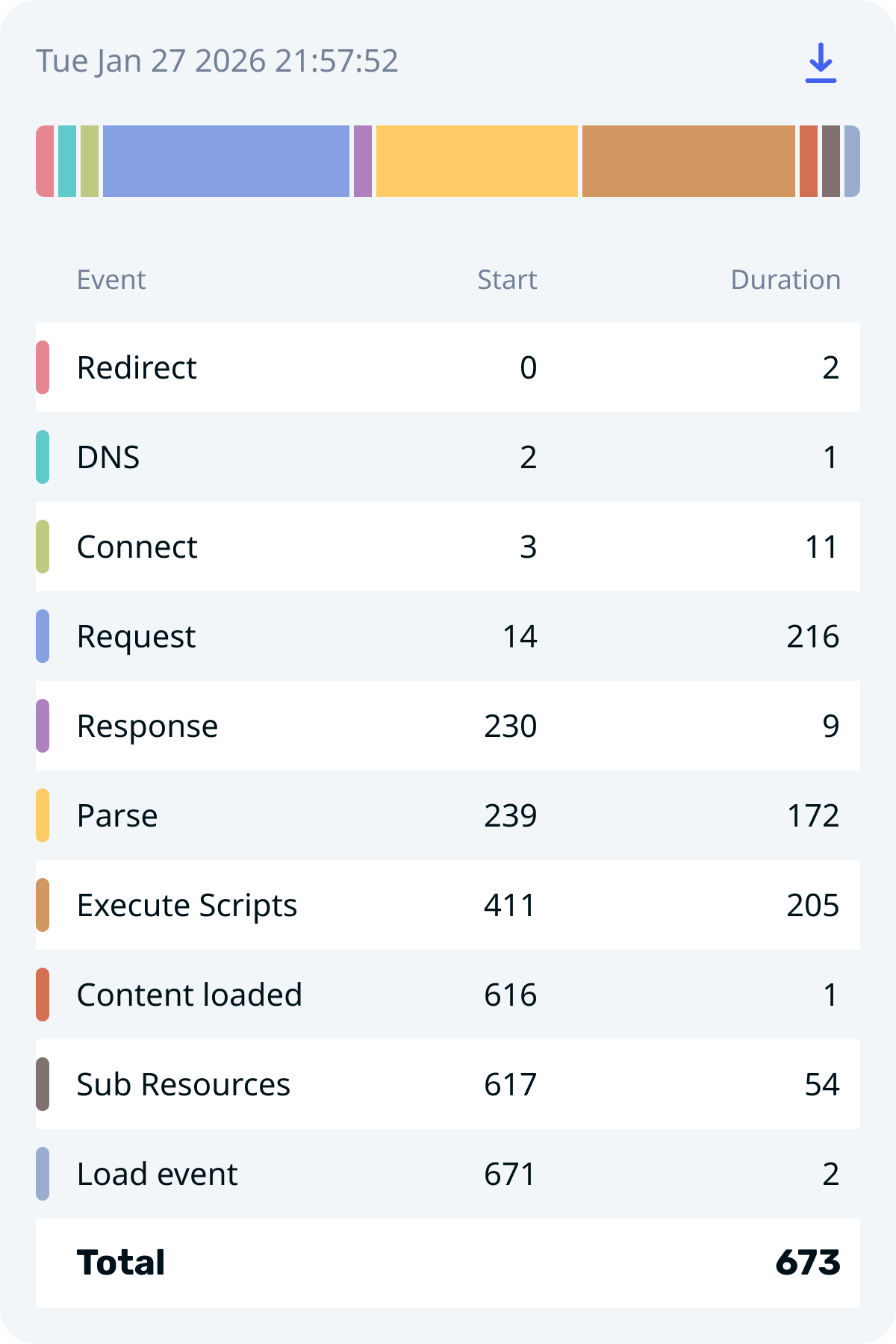
See every stage of page loading — from DNS lookup to final render.
Break down page load time into detailed stages directly in your browser. No setup, no external tools.
Works in Chrome, Edge, Brave & all Chromium browsers
A focused set of tools built for developers who care about performance.
See every stage of page loading — from DNS lookup to final render.
One click to analyze. No external tools or complex setup required.
Color-coded waterfall chart makes bottlenecks immediately obvious.
Download and share performance data with your team.
Fast, minimal, and does not affect your browsing experience.
From install to insight in under 10 seconds.
Navigate to the page you want to analyze
One click in your browser toolbar
See detailed timing for every load stage
Download results to share or archive
Whether you're debugging, optimizing, or monitoring — this fits right in.
Identify which stage causes delays and fix it.
Confirm your performance changes actually work.
See how external scripts impact load time.
Staging vs production side-by-side analysis.
Free, lightweight, and built for developers.
Install Extension